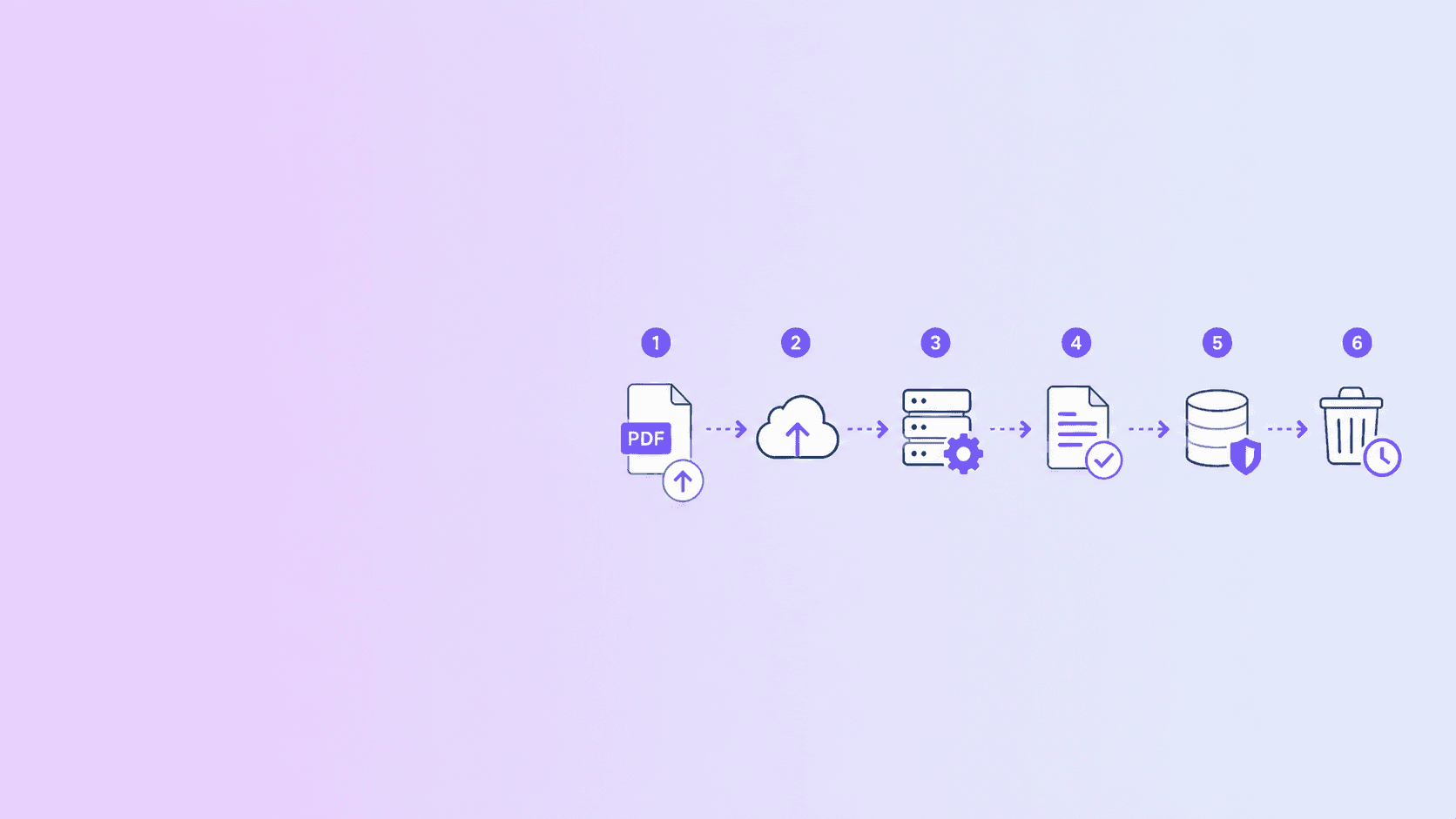
Set the lifecycle before accepting the upload
Online PDF tools should store uploads only for the time needed to validate, process, and deliver the result. For one-off utilities, deletion after download plus a short automatic expiry for abandoned jobs is a strong default.
DocuShell deletes temporary files after one-time streaming and uses a one-hour cleanup ceiling as a fallback.
| Lifecycle stage | Data present | Preferred deletion trigger |
|---|---|---|
| Upload validation | Input temporary file | Immediate rejection cleanup |
| Queued | Validated input | Cancellation or queue expiry |
| Processing | Input and intermediates | Worker completion or failure |
| Ready | Output artifact | Successful or interrupted delivery |
| Abandoned | Undownloaded output | Maximum TTL sweep |
| Logged | Job metadata only | Operational retention policy |
Retention should match the job
A converter does not need to become a document archive. Keeping files “just in case” increases the impact of a security incident and makes privacy promises harder to verify.
If a product offers deliberate cloud storage, that is a different feature and should have separate controls, consent, and deletion behavior.
Cover every storage location
Uploads may appear in API temporary folders, worker directories, generated-output folders, queue metadata, crash dumps, logs, and backups. A retention claim is meaningful only when the data map covers the full path.
The DocuShell Security Posture explains how ephemeral processing, atomic cleanup, and requester-scoped delivery fit together.
Delete after delivery and after abandonment
Remove both input and output when a one-time download finishes or disconnects. Run a scheduled sweep for jobs that fail, stall, or are never downloaded.
Make cleanup idempotent so repeated deletion attempts are safe. Log the job ID and cleanup outcome without logging document contents.
Tell users what happens
State whether a tool works in the browser or uploads to a server. Give the maximum retention period and explain what triggers earlier deletion.
Avoid vague phrases such as “deleted soon.” A concrete lifecycle lets users decide whether the tool fits the document's sensitivity.
Test the promise
Run checks for successful downloads, interrupted downloads, failed jobs, worker crashes, and expired jobs. Confirm the files disappear from the actual storage layer.
Short retention is not a slogan. It is a set of cleanup paths that still work when the normal path does not.
Browser-only versus server-side tools
A browser-only tool can process a file in local memory without uploading the document. Server-side conversion may still be necessary for native software, OCR, or headless-browser rendering. The product should label the difference before the user starts.
“No upload” and “deleted quickly after upload” are different claims. Both can be useful, but they should not be blended.
Define retention events precisely
Document when the clock begins, what successful download means, how interrupted transfers are handled, and when abandoned jobs expire. Apply the policy to inputs, outputs, previews, and intermediate files.
Use a maximum time-to-live as a fallback, not a reason to retain every completed artifact until the deadline.
Retention distinction: “deleted after download” describes the normal path. “Deleted within one hour” describes the safety ceiling for abandoned or failed paths. A trustworthy policy states both.
Operational controls
Give temporary files unpredictable names, isolate tenant paths, restrict worker permissions, and prevent public directory listing. Cleanup jobs should report failures and retry safely.
Monitor file count and age in temporary storage. An increasing oldest-file age is a stronger warning than a cleanup job that merely reports it started.
An abstract Node.js cleanup worker can enforce the fallback ceiling without coupling the policy to a particular storage backend:
const MAX_ARTIFACT_AGE_MS = 60 * 60 * 1000;

export async function cleanupExpiredArtifacts(storage, now = Date.now()) {
  const candidates = await storage.listTemporaryArtifacts();

  for (const artifact of candidates) {
    if (now - artifact.createdAt.getTime() < MAX_ARTIFACT_AGE_MS) continue;

    await storage.deleteIfUnclaimed(artifact.id);
    await storage.recordCleanup({
      artifactId: artifact.id,
      reason: "maximum_ttl_exceeded"
    });
  }
}
The storage implementation must make deleteIfUnclaimed safe when a download and cleanup attempt race. Log identifiers and outcomes, not document contents.
Questions users should ask
Does the file leave the device? Who can access it? Is the result public or authenticated? What causes deletion? What is the maximum retention period? Are backups involved? Is document content written to logs?
Compare what happens during an online PDF upload, one-time PDF download protection, and DocuShell document security. For selecting a tool, use the confidential-document converter safety guide.
Frequently Asked Questions
DocuShell Team
The DocuShell editorial group writes and maintains guides for everyday PDF workflows, with updates made when tool behavior or documented limits change. See our editorial standards for the process behind each article.
Focus: Ephemeral document processing and privacy controls
Questions or feedback? Get in touch.